Tuesday, January 26, 2021

Drupal 8, 9, Debugging Twig templates, The website encountered an unexpected error

Drupal 8 and drupal 9 is not something we used to, like drupal 7, its is entirely disffrent code base and templating engine. for this new dcenario we need to be able to keep our dubugging skills upto date as the new drupal 8 and 9 thorwing errors on us and if we are able to fix it, chances are, we are going to install fresh copy of drupal each time, thiis is what I have heard from some developers and alos eaperinced in early version of drupal 8.

The website encountered an unexpected error. Please try again later.

This is somthing you will see if each time if having any error in yu code.

1) Goto sites/ and copy example.settings.local.php

Paste in > sites/default and rename it to settings.local.php

2) goto the settings.local.php file and uncomment the following line if commented.

$config['system.logging']['error_level'] = 'verbose';

3) goto edit settings.php in same sites/default directory and uncommnet the following line:

 if (file_exists($app_root . '/' . $site_path . '/settings.local.php')) {

   include $app_root . '/' . $site_path . '/settings.local.php';

 }


Additionally add following line in settings.local.php

error_reporting(E_ALL); ini_set('display_errors', TRUE); ini_set('display_startup_errors', TRUE);


Above solution will produce all errors on your screen that help you to fix the error.


Monday, January 11, 2021

Drupal 9 is released

On June 30 2020, Drupal 9 is now relased with a stable version. All the reouces from drupal 8 like themes and modules can be use for drupal 9, it share same admin look & feel almost everything look wise.

download drupal 9


Wednesday, May 30, 2018

First step to secure your Drupal website.

Article Series -1
In recent time Drupal faces too many security threats, people around the world claimed that their website hacked. As a website owner or the developer, we need to keep eye on our websites updates and logs.
In this process, Drupal core and other module update is the first and most important step to do.

In this series, we are going to bring you more information about Drupal security.
Keep eye on our blog to get all information about this,

Please take a look

Thursday, May 19, 2016

Connect to multiple databases in Drupal 7 ?

The way Drupal is designed, it handle most of the user demands, sometime most complex one. Here we are discussing the having multiple databases connection in, and i am very much sure that drupal can do it with easy way. More Details

There are two way we can achieve this.
  • Adding database in settings.php file
  • Adding in module as needed (on the fly)

Adding database in settings.php file

You can add your database in settings.php so that all module can use it.  here is sampe, suppose we have new databses "second_db"
$databases = array();
$databases['default']['default'] = array(
  // Drupal's default credentials here.
  // This is where the Drupal core will store its data.
);
$databases['second_db']['default'] = array(
  // Your secondary database's credentials here.
  // You will be able to explicitly connect to this database from your modules.
);

Here is the way we can access this in our module
// Use the database we set up earlier
db_set_active('second_db');
// Run some queries, process some data
// ...

// Go back to the default database,
// otherwise Drupal will not be able to access its own data later on.
db_set_active();

Adding in module as needed (on the fly)

This is used when a single module needs new database  In this case we can desfine our databse connection directly in our module like this.
 $other_database = array(
      'database' => 'databasename',
      'username' => 'username', // assuming this is necessary
      'password' => 'password', // assuming this is necessary
      'host' => 'localhost', // assumes localhost
      'driver' => 'mysql', // replace with your database driver
  );
  // replace 'YourDatabaseKey' with something that's unique to your module
  Database::addConnectionInfo('YourDatabaseKey', 'default', $other_database);
  db_set_active('YourDatabaseKey');

  // execute queries here

  db_set_active(); // without the paramater means set back to the default for the site
  drupal_set_message(t('The queries have been made.'));

Wednesday, May 11, 2016

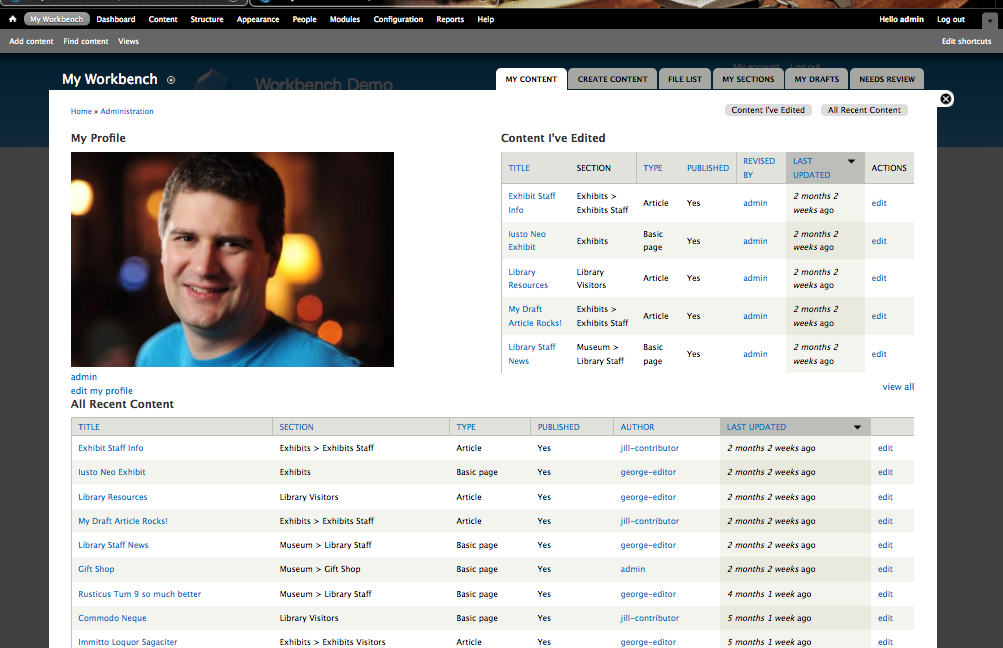
Workbench module to controle content publishing.


Workbench  module used to controle content in website fron different roles. Content slike blog post. article, page or any other custom content type. To achieve this we need at least tw roles,  a content creator and a content publisher.
Content creator will be able to create content
Content publisher will be able to review/edit/publish content.
Workbench module provides multiple states to content like
DRAFT >> NEEDS REVIEW >>PUBLISH, 
we can also create more states.

Monday, May 9, 2016

How to start Drupal 8 ?


Drupal 8 is a advance version of drupal 7.  It comes with some new, exiting features to to work and learn. Since drupal 8 is released in a stable version we can choose to work and contribute our module, themes, patches, documentation etc.

We can devide Drupal 8 learning in 2 parts
What to learn Befor starting Drupal 8


 What is new in Drupal 8

  • Views and ckeditor in core
  • New fields as, email, telephone references etc.
  • Quick edit on nodes and blocks, titile(helps in better contet authoring)
  • Mobile freindly and responsive images
  • Multilingual
  • Webservices


Tuesday, April 21, 2015

Overriding the user menu title function for change My account as username

Replacing My account label with the username in drupal user menu. I have not found any module for this but we can do it by hacking(Not a good Practice) in Drupal user module file
in modules/user/user.module line:2035
/**
 * Menu item title callback for the 'user' path.
 *
 * Anonymous users should see "User account", but authenticated users are
 * expected to see "My account".
 */
function user_menu_title() {
 //return user_is_logged_in() ? t('My account') : t('User account');
}

Change with
  return user_is_logged_in() ? $GLOBALS['user']->name : t('User account');

Reference
https://www.drupal.org/node/1760634
http://www.ipsure.com/blog/2012/showing-username-instead-of-my-account-in-drupal-7/

Tuesday, January 22, 2013

Drupal 7 Starter Themes

Drupal 7 Starter Themes


Michael J. Ross

There are many ways to create a Drupal theme, but probably the most common general approach is to modify an existing theme -- instead of building one from scratch. In the Drupal world, the phrase starter theme refers to any theme that is intended to be used as a starting point for developing a custom theme. Such starter themes tend to be simple and stripped-down, with no aesthetic styling.

Theoretically, any Drupal theme, even the most complex, could be used as a foundation upon which to build a new theme. But beginning with an existing complex theme would be counterproductive in most cases, because time and effort would be required to remove all of the complexity and styling not desired for the intended final theme -- which could be much of the HTML and CSS code, and would defeat the purpose of choosing that theme in the first place.

Thursday, January 17, 2013

Building a Drupal Commerce Product Display

 Building a Drupal Commerce Product Display
Drupal Commerce is a set of modules that add flexible e-commerce functionality to Drupal 7, including features like dynamic product pricing and display, a customizable shopping cart and checkout form, and an administrative back end powered by the Views and Rules contributed modules. The core Commerce modules make very few assumptions about your business rules, allowing you to create a build-to-suit e-commerce application.

Tuesday, December 18, 2012

Drupal Login and registration links in popup.

We have number of modules to replace default login and registration features in drupal. sometimes we need this functionality in popup, and look for drupal modules. Same thing happen to me i looked in Drupal modules index page http://drupal.org/project/modules/index, finally i found the Ajax Login/Register.

This module provides a smooth way for the user to login, register and request new password via AJAX at any Drupal site.

Features:

  • This module provides a block with 2 links (Login, Register) for the anonymous user.
  • When the user clicks on Login or register the requested form appears in a nice ajax popup.
  • The login and register forms can validate using ajax and not redirect on error.
  • On success the module redirects to the user page.
  • When user is logged in, the block provides a Welcome !username message and a link to the user page and a logout link.
  • This module integrates the thickbox plugin with the Ajax module and provides a simple, easy to use and cool login and register block.
Here is the Demo

Wednesday, February 29, 2012

Free Drupal CCK & Views Video Chapters

ADDING A CCK FIELD


THE VIEWS USER INTERFACE

Drupal Books


Drupal 7 Business Solutions

Drupal 7 Theming Cookbook

Mapping with Drupal

Design and Prototyping for Drupal

Drupal For Dummies (2nd Edition)

Drupal User's Guide

More...

Learning Views for Drupal: Sample | Drupal Video

Learning Views for Drupal: Sample | Drupal Video

The Lullabot Learning Series continues with a hands-on look at Drupal's Views module.

In this tutorial video, Jeff Eaton, Nate Haug, and James Walker begin with a general overview of Views' interface and capabilities. The team then builds a complex example showing more advanced Views features such as arguments, relationships, displays, access control, exporting, and theming a view. This video pairs well with Learning CCK, which begins the job board project used throughout each chapter.

100+ Drupal Views tutorials and resources

100+ Drupal Views tutorials and resources
Drupal views 2 and views 3 resources and tutorials collected from the web categorized by Views getting started, Views Theming, Inserting Views, Related content with Views, Views and rss, Views and Taxonomy, Views Arguments, Views coding, Views Exposed filter and Search, Views tips and tricks, Views with Ajax and javascript and Views recipes.

Monday, February 27, 2012

Plesk control panel bug left FTC sites (and thousands more) exposed to Anons

Plesk control panel bug left FTC sites (and thousands more) exposed to Anons
A critical vulnerability in some versions of Parallels' Plesk Panel control panel software appears to have been key to the recent penetration of two servers hosting websites for the Federal Trade Commission. The vulnerability in the software, which is used for remote administration of hosted servers at a large number of Internet hosting companies, could spell bad news for hosting providers who haven't applied the latest updates, as well as their customers.

Tech News - Was Einstein wrong - or was the cable loose? | Techgig

Tech News - Was Einstein wrong - or was the cable loose? | Techgig

Thursday, February 23, 2012

Drupal 7 – Handling file uploads

Drupal 7 – Handling file uploads

When trying to deal with custom forms with file upload fields, you may sometimes get a error regarding extensions:

The specified file “your file name here” could not be uploaded. Only files with the following extensions are allowed: “jpg jpeg gif png txt doc xls pdf ppt pps odt ods odp”

To allow all extensions, you have to manually set the ‘file_validate_extensions’ validator to an empty array.

e.g.


For more information, check out Drupal API’s documentation at http://api.drupal.org/api/drupal/includes–file.inc/function/file_save_upload/7