Showing posts with label Drupal 7. Show all posts

Thursday, May 19, 2016

Connect to multiple databases in Drupal 7 ?

The way Drupal is designed, it handle most of the user demands, sometime most complex one. Here we are discussing the having multiple databases connection in, and i am very much sure that drupal can do it with easy way. More Details

There are two way we can achieve this.
  • Adding database in settings.php file
  • Adding in module as needed (on the fly)

Adding database in settings.php file

You can add your database in settings.php so that all module can use it.  here is sampe, suppose we have new databses "second_db"
$databases = array();
$databases['default']['default'] = array(
  // Drupal's default credentials here.
  // This is where the Drupal core will store its data.
);
$databases['second_db']['default'] = array(
  // Your secondary database's credentials here.
  // You will be able to explicitly connect to this database from your modules.
);

Here is the way we can access this in our module
// Use the database we set up earlier
db_set_active('second_db');
// Run some queries, process some data
// ...

// Go back to the default database,
// otherwise Drupal will not be able to access its own data later on.
db_set_active();

Adding in module as needed (on the fly)

This is used when a single module needs new database  In this case we can desfine our databse connection directly in our module like this.
 $other_database = array(
      'database' => 'databasename',
      'username' => 'username', // assuming this is necessary
      'password' => 'password', // assuming this is necessary
      'host' => 'localhost', // assumes localhost
      'driver' => 'mysql', // replace with your database driver
  );
  // replace 'YourDatabaseKey' with something that's unique to your module
  Database::addConnectionInfo('YourDatabaseKey', 'default', $other_database);
  db_set_active('YourDatabaseKey');

  // execute queries here

  db_set_active(); // without the paramater means set back to the default for the site
  drupal_set_message(t('The queries have been made.'));

Wednesday, May 11, 2016

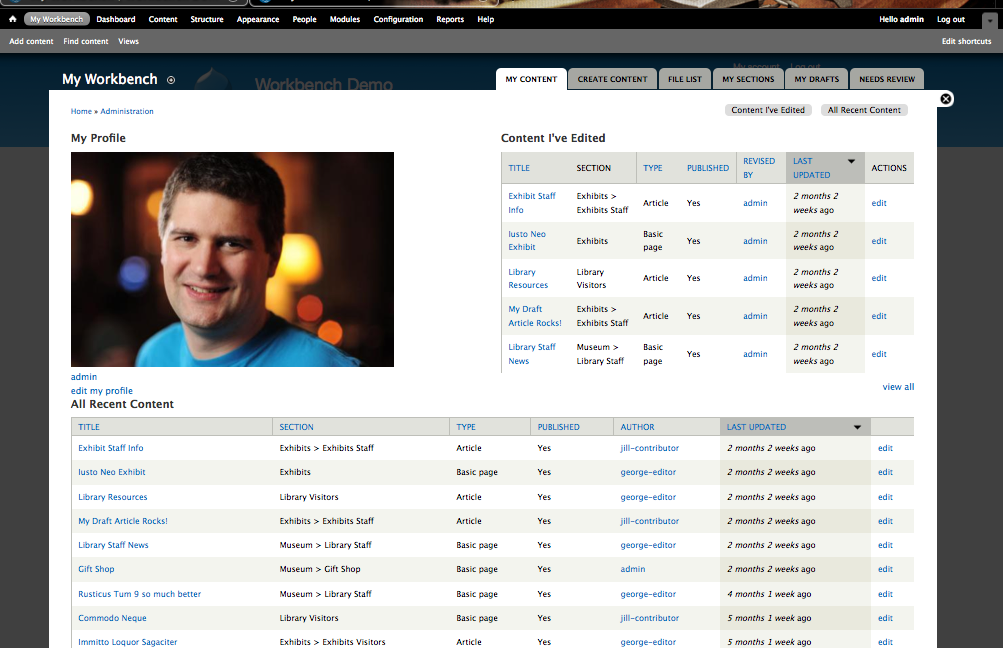
Workbench module to controle content publishing.


Workbench  module used to controle content in website fron different roles. Content slike blog post. article, page or any other custom content type. To achieve this we need at least tw roles,  a content creator and a content publisher.
Content creator will be able to create content
Content publisher will be able to review/edit/publish content.
Workbench module provides multiple states to content like
DRAFT >> NEEDS REVIEW >>PUBLISH, 
we can also create more states.

Monday, May 9, 2016

How to start Drupal 8 ?


Drupal 8 is a advance version of drupal 7.  It comes with some new, exiting features to to work and learn. Since drupal 8 is released in a stable version we can choose to work and contribute our module, themes, patches, documentation etc.

We can devide Drupal 8 learning in 2 parts
What to learn Befor starting Drupal 8


 What is new in Drupal 8

  • Views and ckeditor in core
  • New fields as, email, telephone references etc.
  • Quick edit on nodes and blocks, titile(helps in better contet authoring)
  • Mobile freindly and responsive images
  • Multilingual
  • Webservices


Tuesday, December 18, 2012

Drupal Login and registration links in popup.

We have number of modules to replace default login and registration features in drupal. sometimes we need this functionality in popup, and look for drupal modules. Same thing happen to me i looked in Drupal modules index page http://drupal.org/project/modules/index, finally i found the Ajax Login/Register.

This module provides a smooth way for the user to login, register and request new password via AJAX at any Drupal site.

Features:

  • This module provides a block with 2 links (Login, Register) for the anonymous user.
  • When the user clicks on Login or register the requested form appears in a nice ajax popup.
  • The login and register forms can validate using ajax and not redirect on error.
  • On success the module redirects to the user page.
  • When user is logged in, the block provides a Welcome !username message and a link to the user page and a logout link.
  • This module integrates the thickbox plugin with the Ajax module and provides a simple, easy to use and cool login and register block.
Here is the Demo

Tuesday, January 31, 2012

Structure of the .info file in drupal theme


Contents

Drupal understands the keys listed below. Drupal will use default values for the optional keys not present in the .info file. See the examples set for core themes.
  • name required
    • name = A fantasy name
  • description recommended
    • description = Tableless multi-column theme designed for blogs.
  • screenshot
    • screenshot = screenshot.png
  • version discouraged
    • version = 2.0
  • core required
    • core = 6.x
  • engine required in most cases
    • engine = phptemplate
  • base theme
    • base theme = your theme name
  • regions
    • regions[left] = Left sidebar
    • regions[right] = Right sidebar
    • regions[content] = Content
    • regions[header] = Header
    • regions[footer] = Footer
  • Drupal 7 default regions:
    regions[header] = Header
    regions[highlighted] = Highlighted
    regions[help] = Help
    regions[content] = Content
    regions[sidebar_first] = Left sidebar
    regions[sidebar_second] = Right sidebar
    regions[footer] = Footer
  • features
    • features[] = logo
      features[] = name
      features[] = slogan
      features[] = mission
      features[] = node_user_picture
      features[] = comment_user_picture
      features[] = search
      features[] = favicon
      ; These last two disabled by redefining the
      ; above defaults with only the needed features.
      ; features[] = primary_links
      ; features[] = secondary_links

    • Drupal 7 features
      features[] = logo
      features[] = name
      features[] = slogan
      features[] = node_user_picture
      features[] = comment_user_picture
      features[] = favicon
      features[] = main_menu
      features[] = secondary_menu
         
    •    
  • stylesheets
    • stylesheets[all][] = theStyle.css
  • scripts
    • scripts[] = myscript.js
  • php

Tuesday, September 20, 2011

Create region in node.tpl.php (drupal 6)


1.Add code in yourtheme.info

regions[region_name] =  Region Name


2.Add funciton in template.php


function THEME_NAME_preprocess_node(&$variables, $hook) {
  $variables['
region_name'] = theme('blocks', 'region_name');
}


3.Add code in node.tpl.php


<?php if ($region_name) { ?><div class="region_name"><?php print $region_name?></div><?php }; ?>